
Get Text from Audio and Video — Transcription & Subtitles
Get text from audio and video with SpeechScribe: fast speech-to-text transcription, subtitles line by line, video support, and text-to-speech (TTS) on the roadmap.
From audio to video — and toward a full language workflow
We have long helped turn audio into readable text: lectures, podcasts, conversations, and your own recordings. With version 2.0, Get Text from Audio and Video (SpeechScribe) reaches a new level. It is no longer only a transcription tool — it is a practical environment for watching, listening, and studying material line by line.
The core idea stays the same: you do not just “hear” content — you understand every word. You read, translate, jump back to the right moment, and learn at your own pace.
Faster text from speech
One of the most noticeable upgrades in version 2.0 is faster server-side transcription. Long recordings process much more quickly, so results arrive without a long wait.
At the same time, we kept what users have valued from day one: on-device private mode. You choose — the speed of server processing, or full privacy with no files sent to a server. Both paths remain available.
Video — not only audio
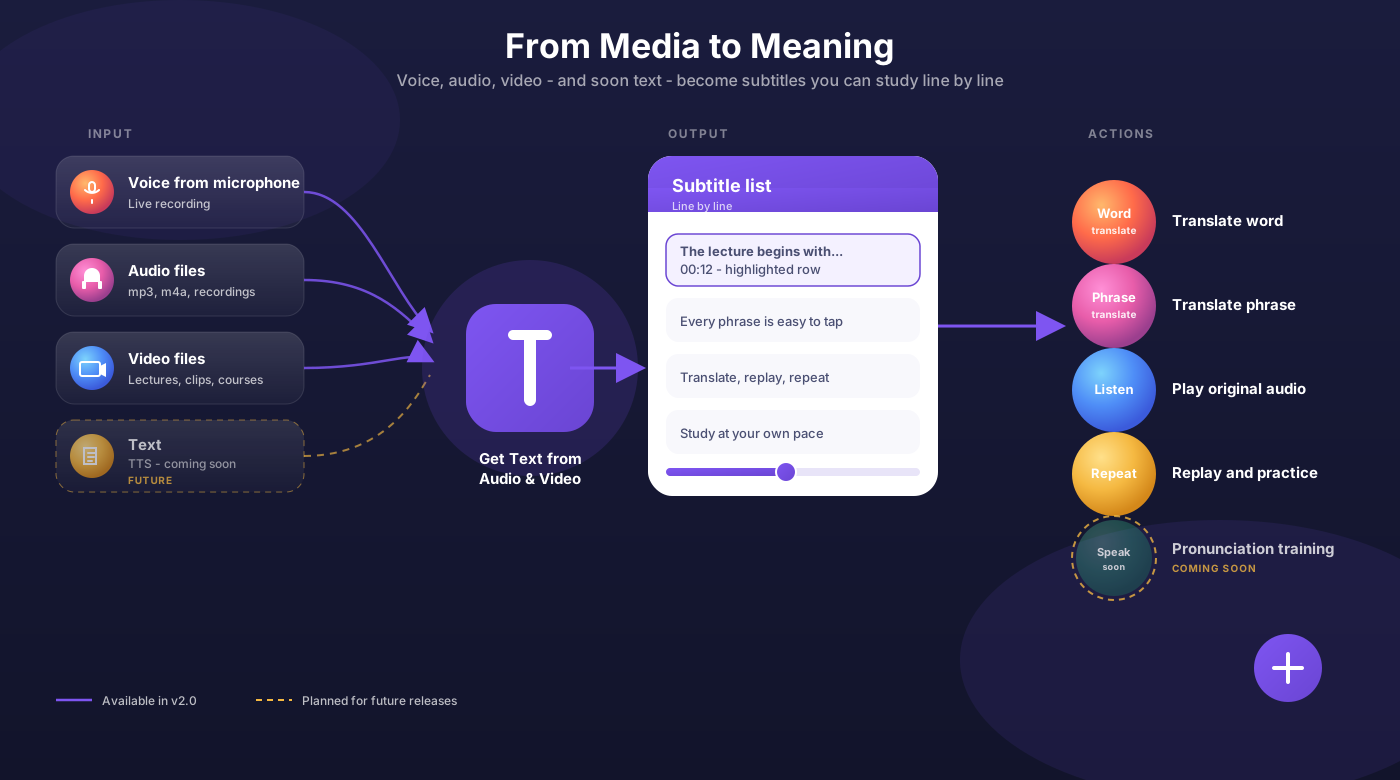
You can now upload video files. A YouTube lecture, a recorded webinar, an interview, a study clip — all become a clear subtitle list you can work with as carefully as an audio transcript.
Video and audio are two different inputs, but the output is the same: structured phrase-by-phrase text, ready to read, translate, and replay.
Fullscreen mode
For video we added fullscreen viewing. Watch the clip edge to edge without losing the link to the text. That is especially useful when you study a lecture or film in a foreign language: the picture stays large, and the subtitles stay within reach.
Listen even when the screen is locked
Another everyday improvement: audio keeps playing when the phone is locked. Listen to a lecture or podcast on the go without keeping the app open or worrying that playback will stop.
For language learning, that changes the routine: you listen with headphones, then return to the right line, read the translation, and repeat the phrase.
Line-by-line translation and subtitle work
What you get is a subtitle list — not one solid wall of text, but tidy lines you can work with:
- translate a word — quickly grasp an unfamiliar term;
- translate a phrase — unpack a full sentence in context;
- listen again — return to the original pronunciation;
- repeat — practice the fragment out loud.
That line-by-line structure sets the app apart from simple voice recorders and “dumb” transcription tools: you do not only receive text — you interact with every line.
What is next
We are only beginning to unlock version 2.0. In upcoming updates we plan to go the other way as well:
- TTS (text-to-speech) — turn text back into audio: read aloud, voice subtitles, create an audio version of study material;
- pronunciation practice — repeat after a speaker, compare your speech to a model, work on intonation and stress.
The app is moving toward a full loop: voice and video → text → translation → voice again. STT and TTS in one product — for people who learn languages on real content, not abstract drills.
Who this version is for
Version 2.0 is useful for:
- students working with video lectures and audio materials;
- self-learners listening to podcasts and interviews in a foreign language;
- teachers preparing handouts from audio and video;
- anyone who wants more than transcription — who wants to learn from what they hear and watch.
In short
Version 2.0 is a big step from “audio to text” to a working environment for language and media. Faster transcription, video, fullscreen, background playback, and line-by-line translation are already here. Next up: text-to-speech and pronunciation training.
Try the update and tell us which workflows feel most useful for you. Download Get Text from Audio and Video (SpeechScribe) on the App Store and start working with audio, video, and subtitles today.

Try it on the App Store
Download Get Text from Audio and Video (SpeechScribe) and try version 2.0.